Let suppliers quote from a private link. No account or app required.
Each invited supplier opens its own RFQ link, reviews the requested items and buyer instructions, then enters price, available quantity, lead time, and remarks in a structured browser form.
Every supplier login becomes another step the buyer has to support.
For an occasional supplier, a password, onboarding flow, or unfamiliar spreadsheet is work before the actual quote. AuraVMS reduces the response path to one private browser link.
Registration and password setup add work before the supplier can review the commercial request.
Items, quantities, dates, files, and buyer notes are harder to follow when they are scattered across an email thread.
Each invited supplier sees only the buyer’s request and its own response—not a shared bid room, competitor prices, or rankings.
Keep the supplier task to four clear steps.
The supplier sees the RFQ and the fields needed to respond—without being onboarded as an AuraVMS user.
Open
Follow the unique invitation link from a desktop or mobile browser.
Review
See requested items, quantities, dates, instructions, and buyer attachments together.
Quote
Enter price, available quantity, lead time, and remarks by item and, on supported plans, attach files.
Submit
Send the private quotation to the buyer’s RFQ workspace for comparison.
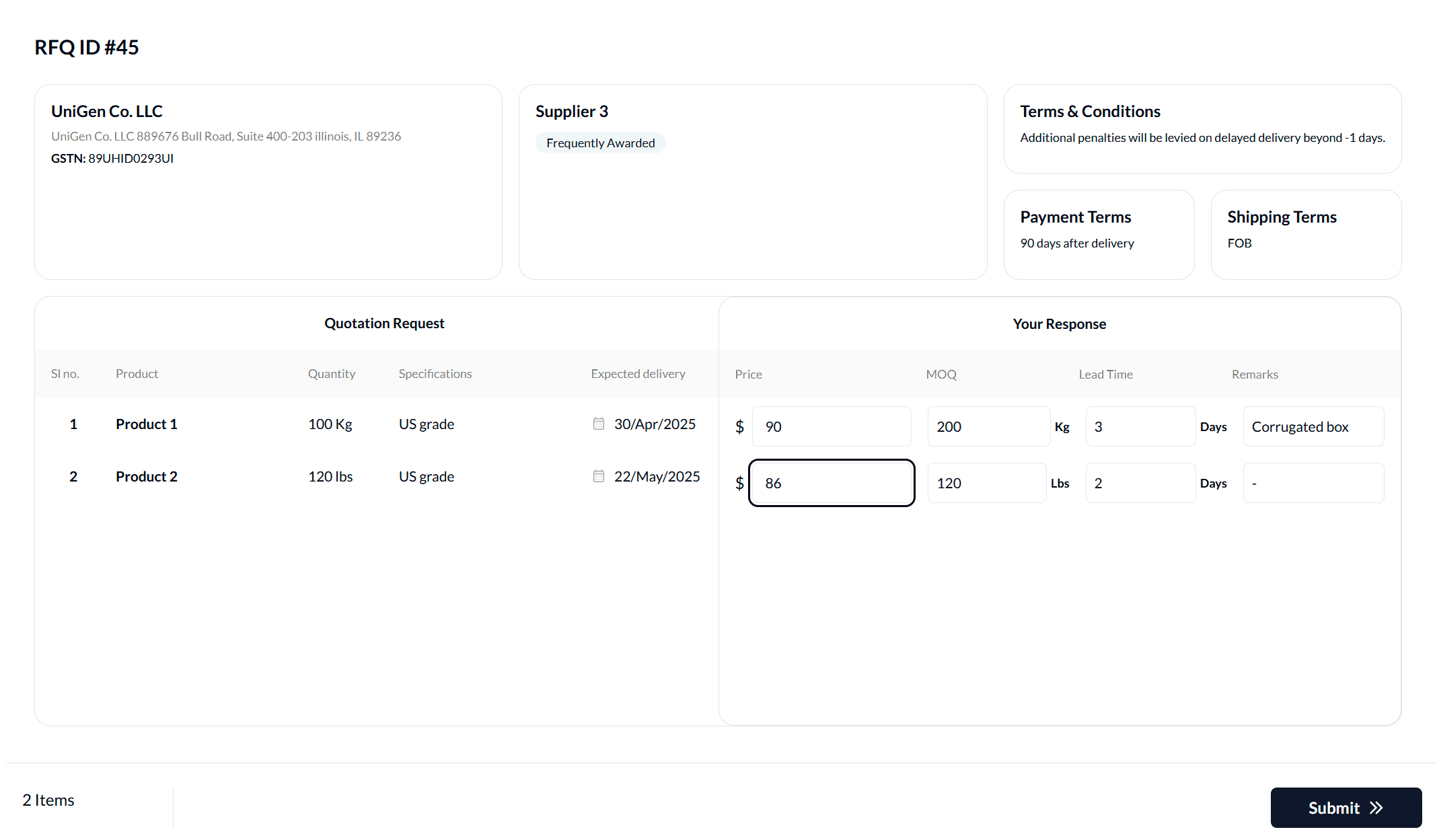
The RFQ and response fields stay together.
Suppliers respond against the buyer’s requested lines, keeping the price and commercial context tied to the correct item.
- No AuraVMS account or app download
- Requested items and buyer instructions in context
- Structured commercial fields for each RFQ item
- No visibility into competing supplier quotations
Answers before you shortlist.
Does a supplier need to create an account?
No. The supplier opens its private invitation link and submits the quotation without creating an AuraVMS account.
How does a no-login supplier response work?
The buyer sends each selected supplier a unique RFQ link. The supplier opens the request, enters its quotation in the browser, and submits the response directly to the buyer’s RFQ workspace.
Can a supplier submit a quote from a phone?
The response page can be opened in a mobile browser. A larger screen may still be more convenient for RFQs with many items or detailed specifications.
Can suppliers see competing prices?
No. Each supplier response is private. Suppliers cannot see another supplier’s quotation, price, or rank.